Apple Podcasts vs. Spotify analytics: why your numbers never match

Nathaniel DeSantis
Podcast Analytics

Introduction
Open Apple Podcasts Connect, Spotify for Creators, and your hosting dashboard side by side and you’ll see three different numbers for the same episode. Every podcaster hits this moment, and every podcaster assumes something is broken.
Nothing is broken. Apple Podcasts vs. Spotify analytics is a comparison of two platforms measuring two different things in two walled gardens — and neither one is measuring your whole audience.
Let’s decode what each dashboard actually counts, why they’ll never agree, and how to get one number you can trust.
Key takeaway
Apple reports followers and plays from the Apple Podcasts app only
Spotify counts streams and consumption inside Spotify only
Your host estimates downloads from server logs across all apps — with its own rules
The dashboards measure different things, so they will never match
A prefix-based source like OP3 gives you one consistent cross-app number
What Apple Podcasts Connect actually counts
Apple’s dashboard is a window into one app: Apple Podcasts. It reports followers, plays, engaged listeners, and listening time — from Apple’s app and nowhere else.
Two things trip people up:
A “play” requires actual playback, so it’s stricter than a download — the file can be fetched and never played
Listeners who use Overcast, Pocket Casts, or any other app on an iPhone are invisible here
The playback data is genuinely useful — where people stop listening is something download counts can’t tell you. Just remember it describes a slice of your audience, not the audience.
What Spotify for Creators actually counts
Spotify is even more of a closed loop. It usually serves audio through its own delivery system, so plays inside Spotify may never touch your host’s logs as ordinary downloads at all.
Its dashboard reports streams, starts, and consumption — inside Spotify only. Useful for understanding your Spotify listeners; useless for counting anyone else.
What your hosting dashboard counts
Your host sees requests for your audio files from every app and estimates downloads from its server logs, typically filtered to the IAB v2 standard — deduplicating repeat requests, tossing bots, ignoring tiny partial fetches.
So the disagreement is structural:
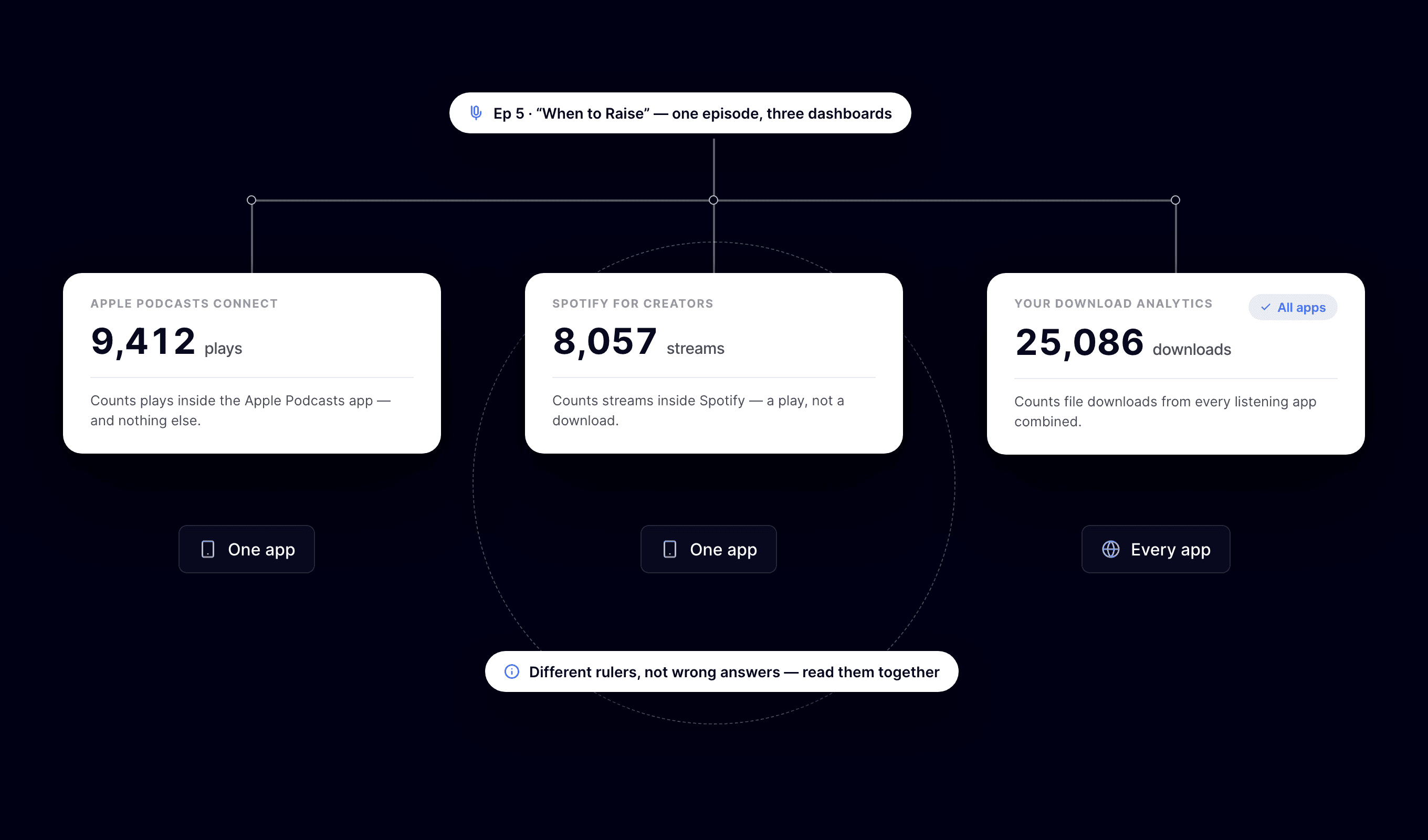
Apple: plays and followers, one app
Spotify: streams and consumption, one app
Host: filtered download estimates, all apps, proprietary interpretation
Different units, different scopes — matching numbers would actually be the suspicious outcome
How to get one consistent number
The fix is measuring at the one point every app has in common: the request for your audio file. That’s what OP3, the Open Podcast Prefix Project, does — a short op3.dev/e/ prefix on your episode URLs counts each request the same open way before redirecting to the file.
A sane setup looks like this:
Use a prefix-based, cross-app source as your primary download number
Treat Apple and Spotify dashboards as engagement supplements — retention, follows, consumption within their apps
Quote the cross-app number to sponsors, with the methodology behind it
Stop expecting the three dashboards to reconcile — they can’t, by design
Because OP3 is open-source with openly published data, it’s also the number a skeptical sponsor can verify — which beats “trust my host’s dashboard” in any negotiation.
Reading the platforms together, not against each other
Once one source of truth is settled, the platform dashboards become genuinely useful. If Apple listeners bail at minute 22, look at what happens at minute 22. If Spotify follower growth outpaces your download growth, new followers haven’t built the listening habit yet.
The app breakdown in a cross-app dashboard also tells you how much weight to give each platform — no point obsessing over Spotify metrics if it’s 15% of your audience.
One more habit worth keeping: check that app breakdown quarterly. Audiences migrate between apps slowly but steadily, and the platform dashboard that deserves your attention this year may not be the same one as last year.
Conclusion
Apple and Spotify aren’t contradicting each other — they’re each describing their own walled garden, while your host estimates the whole yard through its own fence. One cross-app, openly measured number is the way out of the confusion.
BuzzyPod gives you that number on an OP3-powered dashboard — downloads, maps, app breakdowns, episode curves — for $10/month with a 14-day free trial.
Related reading
Introduction
Open Apple Podcasts Connect, Spotify for Creators, and your hosting dashboard side by side and you’ll see three different numbers for the same episode. Every podcaster hits this moment, and every podcaster assumes something is broken.
Nothing is broken. Apple Podcasts vs. Spotify analytics is a comparison of two platforms measuring two different things in two walled gardens — and neither one is measuring your whole audience.
Let’s decode what each dashboard actually counts, why they’ll never agree, and how to get one number you can trust.
Key takeaway
Apple reports followers and plays from the Apple Podcasts app only
Spotify counts streams and consumption inside Spotify only
Your host estimates downloads from server logs across all apps — with its own rules
The dashboards measure different things, so they will never match
A prefix-based source like OP3 gives you one consistent cross-app number
What Apple Podcasts Connect actually counts
Apple’s dashboard is a window into one app: Apple Podcasts. It reports followers, plays, engaged listeners, and listening time — from Apple’s app and nowhere else.
Two things trip people up:
A “play” requires actual playback, so it’s stricter than a download — the file can be fetched and never played
Listeners who use Overcast, Pocket Casts, or any other app on an iPhone are invisible here
The playback data is genuinely useful — where people stop listening is something download counts can’t tell you. Just remember it describes a slice of your audience, not the audience.
What Spotify for Creators actually counts
Spotify is even more of a closed loop. It usually serves audio through its own delivery system, so plays inside Spotify may never touch your host’s logs as ordinary downloads at all.
Its dashboard reports streams, starts, and consumption — inside Spotify only. Useful for understanding your Spotify listeners; useless for counting anyone else.
What your hosting dashboard counts
Your host sees requests for your audio files from every app and estimates downloads from its server logs, typically filtered to the IAB v2 standard — deduplicating repeat requests, tossing bots, ignoring tiny partial fetches.
So the disagreement is structural:
Apple: plays and followers, one app
Spotify: streams and consumption, one app
Host: filtered download estimates, all apps, proprietary interpretation
Different units, different scopes — matching numbers would actually be the suspicious outcome
How to get one consistent number
The fix is measuring at the one point every app has in common: the request for your audio file. That’s what OP3, the Open Podcast Prefix Project, does — a short op3.dev/e/ prefix on your episode URLs counts each request the same open way before redirecting to the file.
A sane setup looks like this:
Use a prefix-based, cross-app source as your primary download number
Treat Apple and Spotify dashboards as engagement supplements — retention, follows, consumption within their apps
Quote the cross-app number to sponsors, with the methodology behind it
Stop expecting the three dashboards to reconcile — they can’t, by design
Because OP3 is open-source with openly published data, it’s also the number a skeptical sponsor can verify — which beats “trust my host’s dashboard” in any negotiation.
Reading the platforms together, not against each other
Once one source of truth is settled, the platform dashboards become genuinely useful. If Apple listeners bail at minute 22, look at what happens at minute 22. If Spotify follower growth outpaces your download growth, new followers haven’t built the listening habit yet.
The app breakdown in a cross-app dashboard also tells you how much weight to give each platform — no point obsessing over Spotify metrics if it’s 15% of your audience.
One more habit worth keeping: check that app breakdown quarterly. Audiences migrate between apps slowly but steadily, and the platform dashboard that deserves your attention this year may not be the same one as last year.
Conclusion
Apple and Spotify aren’t contradicting each other — they’re each describing their own walled garden, while your host estimates the whole yard through its own fence. One cross-app, openly measured number is the way out of the confusion.
BuzzyPod gives you that number on an OP3-powered dashboard — downloads, maps, app breakdowns, episode curves — for $10/month with a 14-day free trial.
Related reading
Introduction
Open Apple Podcasts Connect, Spotify for Creators, and your hosting dashboard side by side and you’ll see three different numbers for the same episode. Every podcaster hits this moment, and every podcaster assumes something is broken.
Nothing is broken. Apple Podcasts vs. Spotify analytics is a comparison of two platforms measuring two different things in two walled gardens — and neither one is measuring your whole audience.
Let’s decode what each dashboard actually counts, why they’ll never agree, and how to get one number you can trust.
Key takeaway
Apple reports followers and plays from the Apple Podcasts app only
Spotify counts streams and consumption inside Spotify only
Your host estimates downloads from server logs across all apps — with its own rules
The dashboards measure different things, so they will never match
A prefix-based source like OP3 gives you one consistent cross-app number
What Apple Podcasts Connect actually counts
Apple’s dashboard is a window into one app: Apple Podcasts. It reports followers, plays, engaged listeners, and listening time — from Apple’s app and nowhere else.
Two things trip people up:
A “play” requires actual playback, so it’s stricter than a download — the file can be fetched and never played
Listeners who use Overcast, Pocket Casts, or any other app on an iPhone are invisible here
The playback data is genuinely useful — where people stop listening is something download counts can’t tell you. Just remember it describes a slice of your audience, not the audience.
What Spotify for Creators actually counts
Spotify is even more of a closed loop. It usually serves audio through its own delivery system, so plays inside Spotify may never touch your host’s logs as ordinary downloads at all.
Its dashboard reports streams, starts, and consumption — inside Spotify only. Useful for understanding your Spotify listeners; useless for counting anyone else.
What your hosting dashboard counts
Your host sees requests for your audio files from every app and estimates downloads from its server logs, typically filtered to the IAB v2 standard — deduplicating repeat requests, tossing bots, ignoring tiny partial fetches.
So the disagreement is structural:
Apple: plays and followers, one app
Spotify: streams and consumption, one app
Host: filtered download estimates, all apps, proprietary interpretation
Different units, different scopes — matching numbers would actually be the suspicious outcome
How to get one consistent number
The fix is measuring at the one point every app has in common: the request for your audio file. That’s what OP3, the Open Podcast Prefix Project, does — a short op3.dev/e/ prefix on your episode URLs counts each request the same open way before redirecting to the file.
A sane setup looks like this:
Use a prefix-based, cross-app source as your primary download number
Treat Apple and Spotify dashboards as engagement supplements — retention, follows, consumption within their apps
Quote the cross-app number to sponsors, with the methodology behind it
Stop expecting the three dashboards to reconcile — they can’t, by design
Because OP3 is open-source with openly published data, it’s also the number a skeptical sponsor can verify — which beats “trust my host’s dashboard” in any negotiation.
Reading the platforms together, not against each other
Once one source of truth is settled, the platform dashboards become genuinely useful. If Apple listeners bail at minute 22, look at what happens at minute 22. If Spotify follower growth outpaces your download growth, new followers haven’t built the listening habit yet.
The app breakdown in a cross-app dashboard also tells you how much weight to give each platform — no point obsessing over Spotify metrics if it’s 15% of your audience.
One more habit worth keeping: check that app breakdown quarterly. Audiences migrate between apps slowly but steadily, and the platform dashboard that deserves your attention this year may not be the same one as last year.
Conclusion
Apple and Spotify aren’t contradicting each other — they’re each describing their own walled garden, while your host estimates the whole yard through its own fence. One cross-app, openly measured number is the way out of the confusion.
BuzzyPod gives you that number on an OP3-powered dashboard — downloads, maps, app breakdowns, episode curves — for $10/month with a 14-day free trial.

