Stop sharing passwords: role-based access for podcast teams

Nathaniel DeSantis
Teams & Agencies

Introduction
Somewhere right now, a podcast team’s entire operation is protected by a password named after the host’s dog, pinned in a Slack channel titled #logins. Role-based access for podcast teams exists because that story never ends well.
Shared passwords aren’t a moral failing — they’re what happens when tools charge per seat and teams are broke. But the bill arrives eventually: a locked-out launch day, a mystery settings change, an ex-contractor who can still see everything.
This post walks through how the shared password happens, the three ways it bites you, and what a proper owner/admin/member setup looks like in practice.
Key takeaway
Shared logins mean no audit trail — you can’t tell who changed what.
Offboarding with a shared password means resetting it for everyone, every time.
One password reset or 2FA hiccup can lock out the whole team on publish day.
Owner, admin, and member roles give each person exactly the access their job needs.
Per-seat pricing causes password sharing; flat pricing with unlimited seats cures it.
How the shared password happens
It starts innocently. You hire an editor, the tool wants another $15 a seat, and you think: they only need it twice a week. So you paste the password into a DM.
Six months later, that password has been shared with two editors, a marketing intern, a virtual assistant, and someone’s cousin who “helped with the website once.” Nobody remembers the full list. That’s the problem in one sentence: shared credentials have no memory.
Three ways shared logins bite you
The failure modes are predictable enough to schedule:
No audit trail — a setting changes, an episode disappears, and everyone was “the same user,” so the answer to “who did this?” is a shrug.
Offboarding risk — when someone leaves, the only fix is resetting the password and redistributing it to everyone who remains. Most teams skip it, so ex-collaborators keep access for months.
Single point of failure — one forgotten password, one 2FA code going to a phone in another timezone, and the whole team is locked out on publish day.
Any one of these is annoying. Stacked together on a show with sponsors and deadlines, they’re expensive.
The owner, admin, member model explained
Role-based access sounds enterprisey, but the version podcast teams need is three tiers:
Owner — runs the account. The buck stops here.
Admin — manages billing and people: invites, role changes, the subscription.
Member — works the show day to day without touching settings.
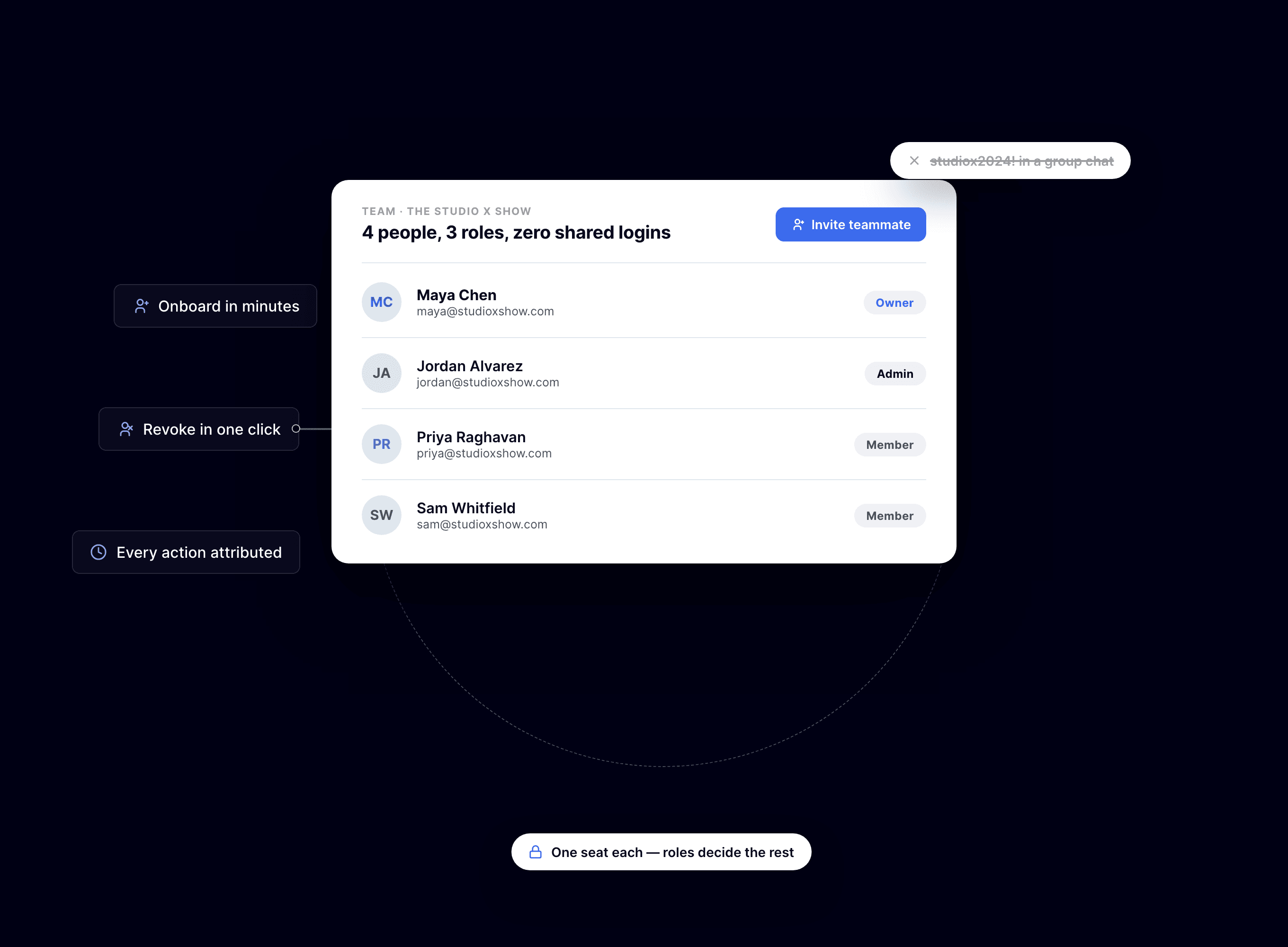
That’s BuzzyPod’s model, and it covers a real team surprisingly well. Editors and marketers are members. Your producer is probably an admin. The host or company principal is the owner. Roles can change anytime, so a promoted producer is one click, not a migration.
Onboarding and offboarding in minutes
With individual accounts, joining and leaving both become trivial. Onboarding is an email invitation: the invitee clicks and they’re in, with the role you chose. No password to whisper, nothing to pin in Slack.
Offboarding is the part that actually protects you:
Revoke the person’s access the day they leave — one click, one person, nobody else affected.
No password resets, no re-sharing, no group lockout.
Everyone else keeps working like nothing happened, because for them nothing did.
Compare that to the shared-password version: reset, redistribute, field four “the new password isn’t working” messages, repeat next quarter.
The pricing problem behind the security problem
Let’s be honest about the root cause: teams share passwords because per-seat pricing makes doing the right thing expensive. Five seats at $15 each is $900 a year to avoid a DM.
BuzzyPod deliberately breaks that trade-off: $10 a month flat per show, unlimited team seats. When the sixth seat costs the same as the first — nothing — there is no economic reason left to share a login. The secure setup is also the cheap one.
Conclusion
Shared passwords are a loan against your future self: convenient now, painful at the worst possible moment later. Individual logins with owner, admin, and member roles cost you a few invitation emails and buy you audit trails, painless offboarding, and no more group lockouts.
If your show’s password currently lives in a group chat, BuzzyPod’s 14-day trial is a low-stakes way to give everyone their own key — without paying per seat for the privilege.
Related reading
Introduction
Somewhere right now, a podcast team’s entire operation is protected by a password named after the host’s dog, pinned in a Slack channel titled #logins. Role-based access for podcast teams exists because that story never ends well.
Shared passwords aren’t a moral failing — they’re what happens when tools charge per seat and teams are broke. But the bill arrives eventually: a locked-out launch day, a mystery settings change, an ex-contractor who can still see everything.
This post walks through how the shared password happens, the three ways it bites you, and what a proper owner/admin/member setup looks like in practice.
Key takeaway
Shared logins mean no audit trail — you can’t tell who changed what.
Offboarding with a shared password means resetting it for everyone, every time.
One password reset or 2FA hiccup can lock out the whole team on publish day.
Owner, admin, and member roles give each person exactly the access their job needs.
Per-seat pricing causes password sharing; flat pricing with unlimited seats cures it.
How the shared password happens
It starts innocently. You hire an editor, the tool wants another $15 a seat, and you think: they only need it twice a week. So you paste the password into a DM.
Six months later, that password has been shared with two editors, a marketing intern, a virtual assistant, and someone’s cousin who “helped with the website once.” Nobody remembers the full list. That’s the problem in one sentence: shared credentials have no memory.
Three ways shared logins bite you
The failure modes are predictable enough to schedule:
No audit trail — a setting changes, an episode disappears, and everyone was “the same user,” so the answer to “who did this?” is a shrug.
Offboarding risk — when someone leaves, the only fix is resetting the password and redistributing it to everyone who remains. Most teams skip it, so ex-collaborators keep access for months.
Single point of failure — one forgotten password, one 2FA code going to a phone in another timezone, and the whole team is locked out on publish day.
Any one of these is annoying. Stacked together on a show with sponsors and deadlines, they’re expensive.
The owner, admin, member model explained
Role-based access sounds enterprisey, but the version podcast teams need is three tiers:
Owner — runs the account. The buck stops here.
Admin — manages billing and people: invites, role changes, the subscription.
Member — works the show day to day without touching settings.
That’s BuzzyPod’s model, and it covers a real team surprisingly well. Editors and marketers are members. Your producer is probably an admin. The host or company principal is the owner. Roles can change anytime, so a promoted producer is one click, not a migration.
Onboarding and offboarding in minutes
With individual accounts, joining and leaving both become trivial. Onboarding is an email invitation: the invitee clicks and they’re in, with the role you chose. No password to whisper, nothing to pin in Slack.
Offboarding is the part that actually protects you:
Revoke the person’s access the day they leave — one click, one person, nobody else affected.
No password resets, no re-sharing, no group lockout.
Everyone else keeps working like nothing happened, because for them nothing did.
Compare that to the shared-password version: reset, redistribute, field four “the new password isn’t working” messages, repeat next quarter.
The pricing problem behind the security problem
Let’s be honest about the root cause: teams share passwords because per-seat pricing makes doing the right thing expensive. Five seats at $15 each is $900 a year to avoid a DM.
BuzzyPod deliberately breaks that trade-off: $10 a month flat per show, unlimited team seats. When the sixth seat costs the same as the first — nothing — there is no economic reason left to share a login. The secure setup is also the cheap one.
Conclusion
Shared passwords are a loan against your future self: convenient now, painful at the worst possible moment later. Individual logins with owner, admin, and member roles cost you a few invitation emails and buy you audit trails, painless offboarding, and no more group lockouts.
If your show’s password currently lives in a group chat, BuzzyPod’s 14-day trial is a low-stakes way to give everyone their own key — without paying per seat for the privilege.
Related reading
Introduction
Somewhere right now, a podcast team’s entire operation is protected by a password named after the host’s dog, pinned in a Slack channel titled #logins. Role-based access for podcast teams exists because that story never ends well.
Shared passwords aren’t a moral failing — they’re what happens when tools charge per seat and teams are broke. But the bill arrives eventually: a locked-out launch day, a mystery settings change, an ex-contractor who can still see everything.
This post walks through how the shared password happens, the three ways it bites you, and what a proper owner/admin/member setup looks like in practice.
Key takeaway
Shared logins mean no audit trail — you can’t tell who changed what.
Offboarding with a shared password means resetting it for everyone, every time.
One password reset or 2FA hiccup can lock out the whole team on publish day.
Owner, admin, and member roles give each person exactly the access their job needs.
Per-seat pricing causes password sharing; flat pricing with unlimited seats cures it.
How the shared password happens
It starts innocently. You hire an editor, the tool wants another $15 a seat, and you think: they only need it twice a week. So you paste the password into a DM.
Six months later, that password has been shared with two editors, a marketing intern, a virtual assistant, and someone’s cousin who “helped with the website once.” Nobody remembers the full list. That’s the problem in one sentence: shared credentials have no memory.
Three ways shared logins bite you
The failure modes are predictable enough to schedule:
No audit trail — a setting changes, an episode disappears, and everyone was “the same user,” so the answer to “who did this?” is a shrug.
Offboarding risk — when someone leaves, the only fix is resetting the password and redistributing it to everyone who remains. Most teams skip it, so ex-collaborators keep access for months.
Single point of failure — one forgotten password, one 2FA code going to a phone in another timezone, and the whole team is locked out on publish day.
Any one of these is annoying. Stacked together on a show with sponsors and deadlines, they’re expensive.
The owner, admin, member model explained
Role-based access sounds enterprisey, but the version podcast teams need is three tiers:
Owner — runs the account. The buck stops here.
Admin — manages billing and people: invites, role changes, the subscription.
Member — works the show day to day without touching settings.
That’s BuzzyPod’s model, and it covers a real team surprisingly well. Editors and marketers are members. Your producer is probably an admin. The host or company principal is the owner. Roles can change anytime, so a promoted producer is one click, not a migration.
Onboarding and offboarding in minutes
With individual accounts, joining and leaving both become trivial. Onboarding is an email invitation: the invitee clicks and they’re in, with the role you chose. No password to whisper, nothing to pin in Slack.
Offboarding is the part that actually protects you:
Revoke the person’s access the day they leave — one click, one person, nobody else affected.
No password resets, no re-sharing, no group lockout.
Everyone else keeps working like nothing happened, because for them nothing did.
Compare that to the shared-password version: reset, redistribute, field four “the new password isn’t working” messages, repeat next quarter.
The pricing problem behind the security problem
Let’s be honest about the root cause: teams share passwords because per-seat pricing makes doing the right thing expensive. Five seats at $15 each is $900 a year to avoid a DM.
BuzzyPod deliberately breaks that trade-off: $10 a month flat per show, unlimited team seats. When the sixth seat costs the same as the first — nothing — there is no economic reason left to share a login. The secure setup is also the cheap one.
Conclusion
Shared passwords are a loan against your future self: convenient now, painful at the worst possible moment later. Individual logins with owner, admin, and member roles cost you a few invitation emails and buy you audit trails, painless offboarding, and no more group lockouts.
If your show’s password currently lives in a group chat, BuzzyPod’s 14-day trial is a low-stakes way to give everyone their own key — without paying per seat for the privilege.

