What to send podcast guests before you hit record: a checklist

Nathaniel DeSantis
Guest Management
Introduction
Every host has lived it: the guest joins from a phone in a moving car, has no idea what the episode is about, and asks “wait, do I need to sign something?” three weeks after it airs. A podcast guest checklist exists so none of that happens to you again.
Guests aren’t flaky — they’re busy, and podcasting is your job, not theirs. Whatever you don’t send them explicitly, they will not do. The fix is one standard packet, sent to every guest, every time.
Here’s exactly what belongs in it, and why one item should go out earlier than you probably send it now.
Key takeaway
Send every guest the same six-item packet — no improvising per guest.
The release form goes out early, with the confirmation, not after publish.
Tech instructions prevent the bad audio you can’t fix in the edit.
Ask for the bio and headshot up front; chasing them later delays publishing.
Set publish-date expectations so guests aren’t emailing you weekly for the link.
The six things every guest packet needs
Calendar confirmation with the recording link inside the invite.
Tech setup instructions: gear, environment, and connection.
Episode topic outline and sample questions.
The guest release form, ready to e-sign.
A request for their bio and headshot, with a deadline.
Publish-date expectations and what you’ll send them on launch day.
Six items, one email (or two, if you split logistics from prep). Let’s take them in turn.
Calendar confirmation and recording link
The calendar invite is the single highest-leverage item, because it’s the one place a busy guest will actually look on recording day. Put the recording link, the expected duration, and your phone or email in the invite body.
A scheduling link upstream of this saves the back-and-forth; whichever tool you use, the invite that lands on their calendar is what counts.
Tech setup instructions
You cannot edit your way out of a bad room. Send a short, friendly spec:
Wear wired headphones — any pair beats speakers, which cause echo.
Use an external mic if you have one; a phone headset mic beats a laptop’s built-in.
Pick a small, quiet room with soft surfaces; avoid kitchens and cars.
Join from a computer on a stable connection, hardwired if possible.
Close notification-happy apps before we start.
Frame it as “how to sound great,” not “rules,” and compliance goes way up.
Topic outline and questions
Guests give better answers when they’ve had a shower to think about them. Send the episode angle in a sentence or two, plus three to five sample questions — with a note that the conversation will wander, so it stays natural.
The release form: send it early, not eventually
Most shows treat the release as post-production paperwork. That’s backwards. Before recording, it’s a two-minute e-sign attached to something exciting; after publish, it’s an awkward favor — and an unsigned release means an episode you can’t confidently clip, repurpose, or license later.
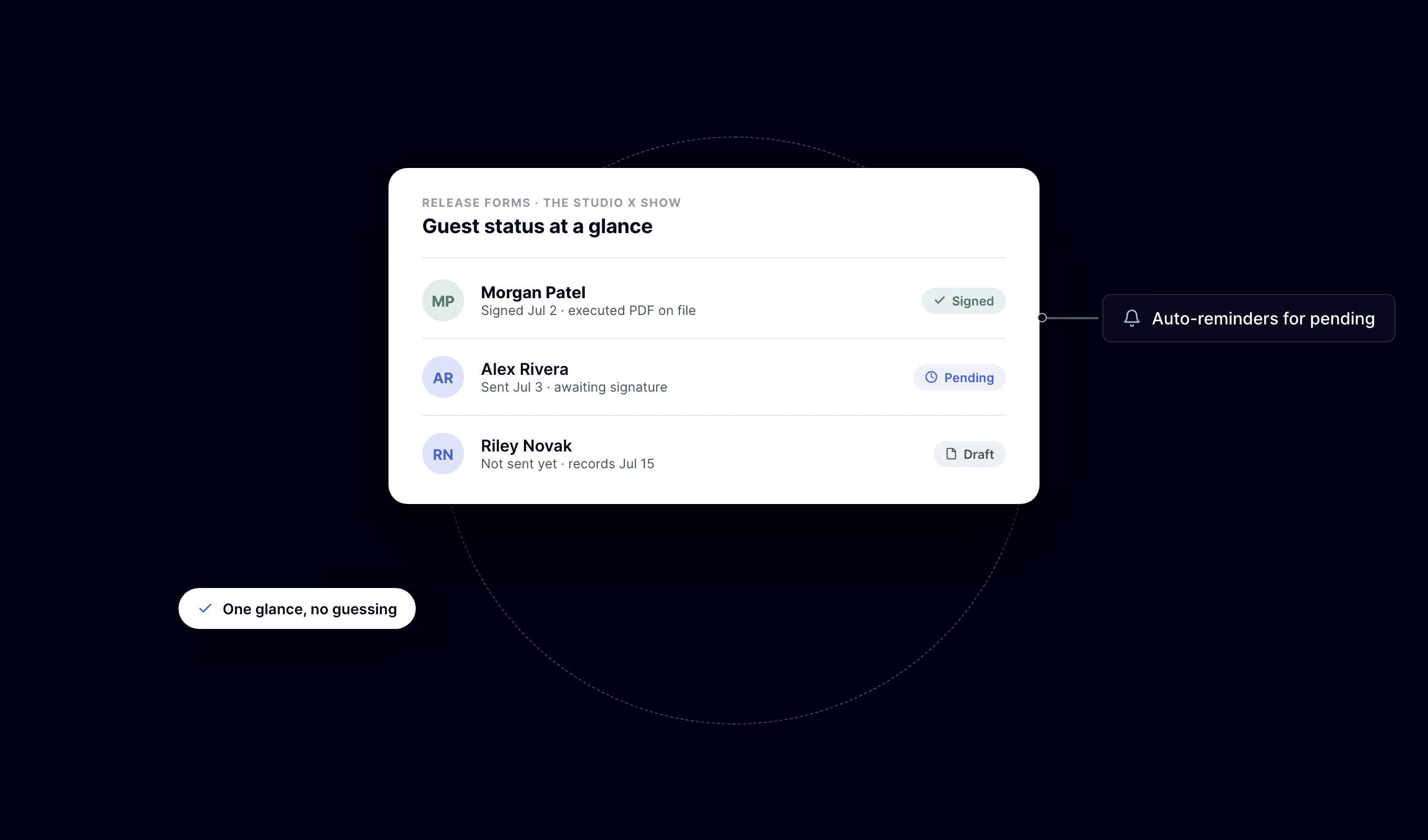
So it goes in the packet, right next to the calendar invite. With BuzzyPod, the release is ready-written: fill in your podcast name, the guest’s email, and the governing state, sign as the show’s representative, and the guest signs from a secure email link on any device — no account needed. Both parties automatically get the executed PDF, sealed with a SHA-256 hash and a tamper-evident audit trail of created, sent, viewed, and signed. If it sits in pending, resend it; if plans change, void it. The status board tells you before recording day whether you’re covered.
Bio, headshot, and publish expectations
The bio and headshot are the sneaky publish-blockers — nobody remembers them until the episode page is being built. Ask up front, with a deadline a week before recording, and specify format: a two-to-three sentence bio and a high-resolution headshot.
Then set publish expectations in one line: “We expect this to go live the week of the 14th, and we’ll send you the link plus shareable assets that morning.” That single sentence prevents every “any update?” email between now and launch.
Conclusion
A guest packet is twenty minutes of setup that pays off on every episode forever: better audio, better answers, no paperwork chase, no publish-day scramble. Build it once, send it always.
And if the release form is the item your show keeps postponing, BuzzyPod bakes it into the flow — e-signed from a link, tracked to done — so “send the release early” stops being advice and starts being your default.
Related reading
Introduction
Every host has lived it: the guest joins from a phone in a moving car, has no idea what the episode is about, and asks “wait, do I need to sign something?” three weeks after it airs. A podcast guest checklist exists so none of that happens to you again.
Guests aren’t flaky — they’re busy, and podcasting is your job, not theirs. Whatever you don’t send them explicitly, they will not do. The fix is one standard packet, sent to every guest, every time.
Here’s exactly what belongs in it, and why one item should go out earlier than you probably send it now.
Key takeaway
Send every guest the same six-item packet — no improvising per guest.
The release form goes out early, with the confirmation, not after publish.
Tech instructions prevent the bad audio you can’t fix in the edit.
Ask for the bio and headshot up front; chasing them later delays publishing.
Set publish-date expectations so guests aren’t emailing you weekly for the link.
The six things every guest packet needs
Calendar confirmation with the recording link inside the invite.
Tech setup instructions: gear, environment, and connection.
Episode topic outline and sample questions.
The guest release form, ready to e-sign.
A request for their bio and headshot, with a deadline.
Publish-date expectations and what you’ll send them on launch day.
Six items, one email (or two, if you split logistics from prep). Let’s take them in turn.
Calendar confirmation and recording link
The calendar invite is the single highest-leverage item, because it’s the one place a busy guest will actually look on recording day. Put the recording link, the expected duration, and your phone or email in the invite body.
A scheduling link upstream of this saves the back-and-forth; whichever tool you use, the invite that lands on their calendar is what counts.
Tech setup instructions
You cannot edit your way out of a bad room. Send a short, friendly spec:
Wear wired headphones — any pair beats speakers, which cause echo.
Use an external mic if you have one; a phone headset mic beats a laptop’s built-in.
Pick a small, quiet room with soft surfaces; avoid kitchens and cars.
Join from a computer on a stable connection, hardwired if possible.
Close notification-happy apps before we start.
Frame it as “how to sound great,” not “rules,” and compliance goes way up.
Topic outline and questions
Guests give better answers when they’ve had a shower to think about them. Send the episode angle in a sentence or two, plus three to five sample questions — with a note that the conversation will wander, so it stays natural.
The release form: send it early, not eventually
Most shows treat the release as post-production paperwork. That’s backwards. Before recording, it’s a two-minute e-sign attached to something exciting; after publish, it’s an awkward favor — and an unsigned release means an episode you can’t confidently clip, repurpose, or license later.
So it goes in the packet, right next to the calendar invite. With BuzzyPod, the release is ready-written: fill in your podcast name, the guest’s email, and the governing state, sign as the show’s representative, and the guest signs from a secure email link on any device — no account needed. Both parties automatically get the executed PDF, sealed with a SHA-256 hash and a tamper-evident audit trail of created, sent, viewed, and signed. If it sits in pending, resend it; if plans change, void it. The status board tells you before recording day whether you’re covered.
Bio, headshot, and publish expectations
The bio and headshot are the sneaky publish-blockers — nobody remembers them until the episode page is being built. Ask up front, with a deadline a week before recording, and specify format: a two-to-three sentence bio and a high-resolution headshot.
Then set publish expectations in one line: “We expect this to go live the week of the 14th, and we’ll send you the link plus shareable assets that morning.” That single sentence prevents every “any update?” email between now and launch.
Conclusion
A guest packet is twenty minutes of setup that pays off on every episode forever: better audio, better answers, no paperwork chase, no publish-day scramble. Build it once, send it always.
And if the release form is the item your show keeps postponing, BuzzyPod bakes it into the flow — e-signed from a link, tracked to done — so “send the release early” stops being advice and starts being your default.
Related reading
Introduction
Every host has lived it: the guest joins from a phone in a moving car, has no idea what the episode is about, and asks “wait, do I need to sign something?” three weeks after it airs. A podcast guest checklist exists so none of that happens to you again.
Guests aren’t flaky — they’re busy, and podcasting is your job, not theirs. Whatever you don’t send them explicitly, they will not do. The fix is one standard packet, sent to every guest, every time.
Here’s exactly what belongs in it, and why one item should go out earlier than you probably send it now.
Key takeaway
Send every guest the same six-item packet — no improvising per guest.
The release form goes out early, with the confirmation, not after publish.
Tech instructions prevent the bad audio you can’t fix in the edit.
Ask for the bio and headshot up front; chasing them later delays publishing.
Set publish-date expectations so guests aren’t emailing you weekly for the link.
The six things every guest packet needs
Calendar confirmation with the recording link inside the invite.
Tech setup instructions: gear, environment, and connection.
Episode topic outline and sample questions.
The guest release form, ready to e-sign.
A request for their bio and headshot, with a deadline.
Publish-date expectations and what you’ll send them on launch day.
Six items, one email (or two, if you split logistics from prep). Let’s take them in turn.
Calendar confirmation and recording link
The calendar invite is the single highest-leverage item, because it’s the one place a busy guest will actually look on recording day. Put the recording link, the expected duration, and your phone or email in the invite body.
A scheduling link upstream of this saves the back-and-forth; whichever tool you use, the invite that lands on their calendar is what counts.
Tech setup instructions
You cannot edit your way out of a bad room. Send a short, friendly spec:
Wear wired headphones — any pair beats speakers, which cause echo.
Use an external mic if you have one; a phone headset mic beats a laptop’s built-in.
Pick a small, quiet room with soft surfaces; avoid kitchens and cars.
Join from a computer on a stable connection, hardwired if possible.
Close notification-happy apps before we start.
Frame it as “how to sound great,” not “rules,” and compliance goes way up.
Topic outline and questions
Guests give better answers when they’ve had a shower to think about them. Send the episode angle in a sentence or two, plus three to five sample questions — with a note that the conversation will wander, so it stays natural.
The release form: send it early, not eventually
Most shows treat the release as post-production paperwork. That’s backwards. Before recording, it’s a two-minute e-sign attached to something exciting; after publish, it’s an awkward favor — and an unsigned release means an episode you can’t confidently clip, repurpose, or license later.
So it goes in the packet, right next to the calendar invite. With BuzzyPod, the release is ready-written: fill in your podcast name, the guest’s email, and the governing state, sign as the show’s representative, and the guest signs from a secure email link on any device — no account needed. Both parties automatically get the executed PDF, sealed with a SHA-256 hash and a tamper-evident audit trail of created, sent, viewed, and signed. If it sits in pending, resend it; if plans change, void it. The status board tells you before recording day whether you’re covered.
Bio, headshot, and publish expectations
The bio and headshot are the sneaky publish-blockers — nobody remembers them until the episode page is being built. Ask up front, with a deadline a week before recording, and specify format: a two-to-three sentence bio and a high-resolution headshot.
Then set publish expectations in one line: “We expect this to go live the week of the 14th, and we’ll send you the link plus shareable assets that morning.” That single sentence prevents every “any update?” email between now and launch.
Conclusion
A guest packet is twenty minutes of setup that pays off on every episode forever: better audio, better answers, no paperwork chase, no publish-day scramble. Build it once, send it always.
And if the release form is the item your show keeps postponing, BuzzyPod bakes it into the flow — e-signed from a link, tracked to done — so “send the release early” stops being advice and starts being your default.

